A self-hosted, multi-project AI IDE for your git worktrees and the Claude Code sessions running on them: a native desktop app and a web UI, from any device.
English · Français
Session discovery & resume, multi-repo worktree lifecycle, sessions on your main branch or any worktree, live session states, the web terminal, mobile supervision (installable PWA, Web Push when a session needs you, answer a prompt without opening a terminal), and work groups (drive several related repos from a single Claude session) are all implemented and tested.
The latest milestone turns Arboretum into a real **multi-project AI IDE**: a single workspace (route `/ide`, the default view on desktop) that holds **all** your open projects at once, no more one IDE window per project. A single left tree (project, then main checkout and worktrees, then Claude session), a tabbed Monaco editor at the center (several files from different projects side by side, inline diffs), Claude terminals in a bottom dock, and Git / Sessions / Groups panels via an activity bar. It ships both as a **native desktop app** (Linux, Windows, macOS) and the same web UI, backed by a real-time file-system watcher, selective staging / discard / amend / fetch / pull, automatic session archival, real-time settings sync, and encrypted remote git services (GitHub / GitLab / Gitea) with HTTPS clone.
---
## Screenshots
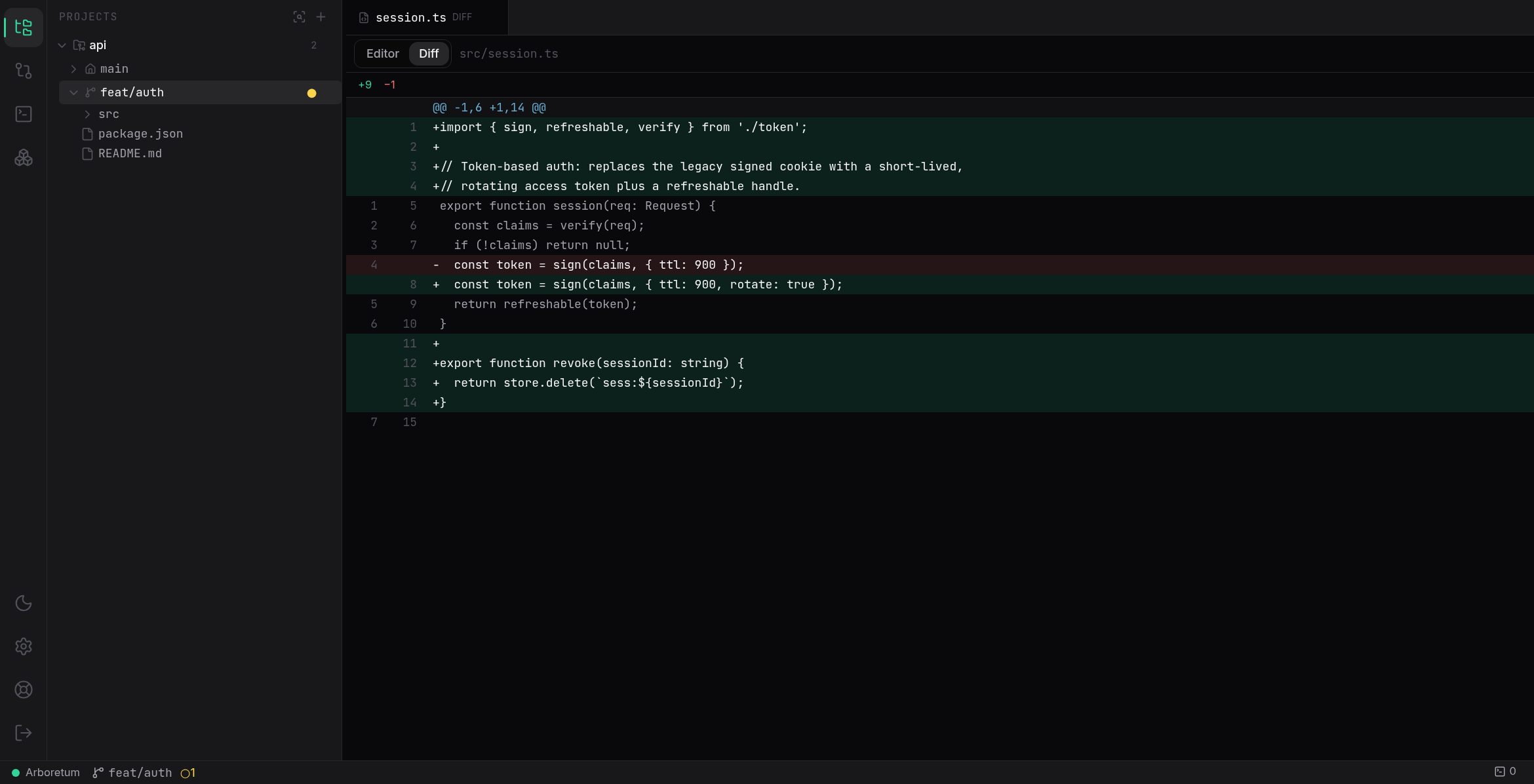
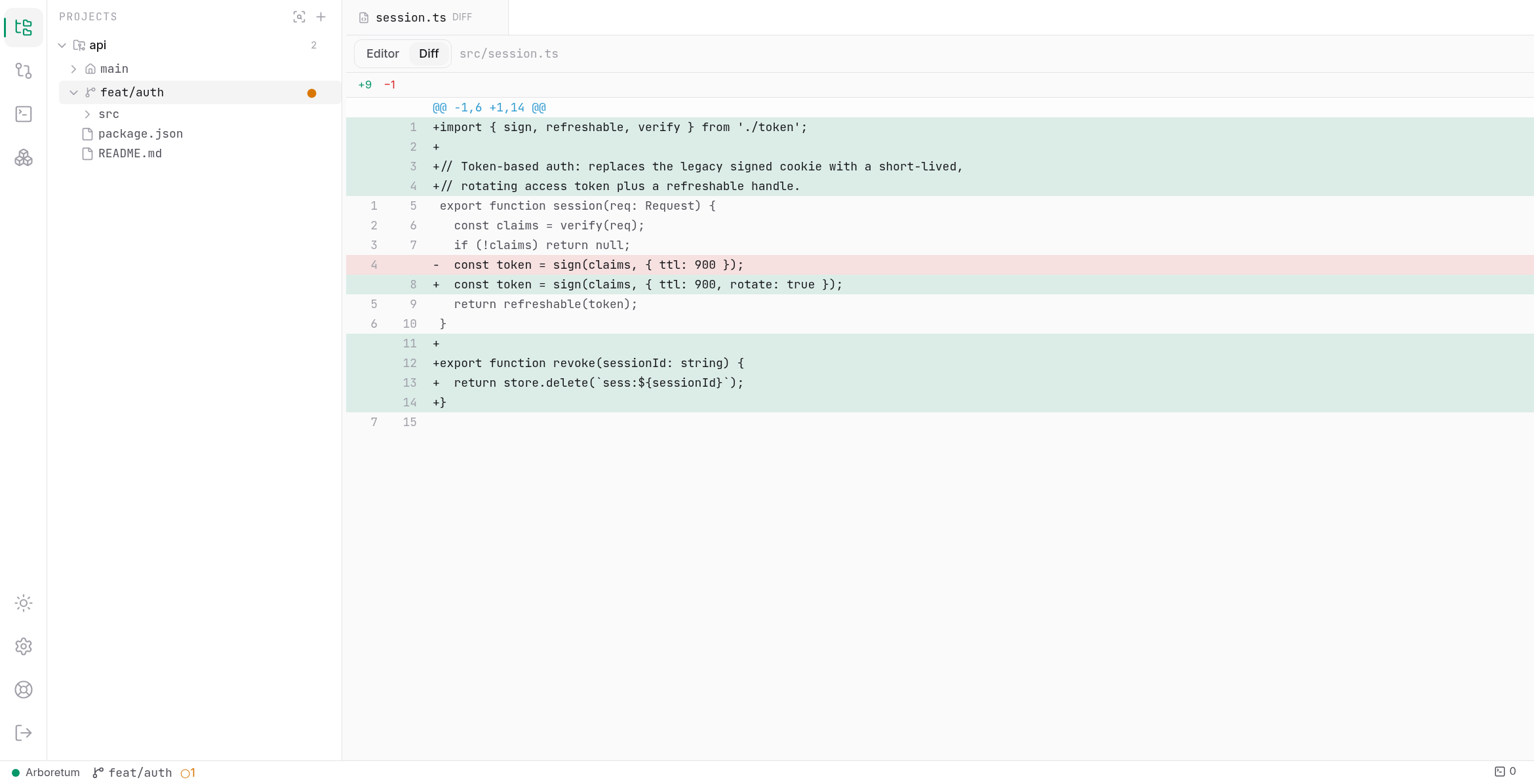
One workspace for every project: a unified tree, a tabbed Monaco editor with inline diffs, and docked Claude terminals. Dark and light themes.
---
## The problem
Working with AI coding agents changed how we use git: one feature = one worktree = one Claude Code session, several of them in parallel. But the tooling didn't follow:
- `git worktree list` across multiple repos is a chore, worktrees pile up, each needs its `node_modules` and `.env`.
- Claude Code sessions are scattered: some running in terminals, some resumable from history, with no consolidated view of *which one is waiting for your input*.
- When you step away from your desk, a session blocked on a permission prompt stays blocked.
## What Arboretum does
A single Node.js daemon you run on your dev machine (as a native desktop app, or via `npx @johanleroy/git-arboretum`), serving a UI usable from your desktop, phone or tablet:
- **Multi-repo worktree dashboard**: every worktree of every registered repo, with its git state (branch, ahead/behind, dirty files) *and* the state of its Claude Code session (busy / waiting for input / idle / resumable).
- **Full worktree lifecycle**: create (with per-repo post-create hooks: `npm ci`, copy `.env`…), adopt worktrees created by hand, delete with guardrails, prune orphans.
- **Session discovery & resume**: sessions you launched in your own terminal show up automatically; resume dead ones, observe or fork live ones. Never corrupts a live session. Hide the old ones that clutter the list (one click clears the whole external history; they stay resumable).
- **Web terminal**: full xterm.js terminal to every managed session, surviving browser disconnects; truly fullscreen, with the prompt pinned to the bottom and full scrollback above.
- **Multi-project IDE**: one workspace for every open project at once (no per-project window). A single tree (project, worktrees, Claude sessions), a tabbed Monaco editor (several files from different projects side by side, with inline per-file diffs), a bottom dock of session terminals, and Git / Sessions / Groups panels. Edit files, stage changes selectively, commit (or amend), fetch/pull and push, all in one place. A real-time file-system watcher keeps the view live as the agent edits. Available as a native desktop app and in the browser.
- **Supervision from your phone**: installable PWA with push notifications when a session needs you; answer a prompt (its options, or deny) without opening a terminal.
- **Work groups**: bundle related repos (e.g. an API, its web frontend and its docs) into a named group, then launch **one Claude session that spans all of them at once** (via the CLI's `--add-dir`): a single conversation with one shared context working across every repo, plus a unified view of all their worktrees and a side-by-side multi-terminal grid. Group sessions can either create the same branch worktree in each repo first, or run straight on the main checkouts.
- **Remote git services**: connect your GitHub, GitLab or Gitea accounts (personal access token or app password), stored **encrypted at rest** (AES-256-GCM); browse your remote repositories and clone them over HTTPS with live progress, straight from the dashboard.
- **Automatic archival**: finished sessions are archived automatically after a configurable retention window (30 days by default), so the list stays focused on what's live while the history is one toggle away.
- **VS Code extension**: a native extension (not a webview) that brings the live tree, native session terminals, waiting alerts and git actions right into your editor. See [VS Code extension](#vs-code-extension).
---
## Requirements
- **Node.js ≥ 22.16** for the `npx` / from-source usage: required, not just recommended. Arboretum persists state with `node:sqlite` (`DatabaseSync`), which is native and stable only from this version. (`.nvmrc` pins `22`.) The **desktop app bundles its own Node runtime**, so its end users do not need to install Node.
- **The `claude` CLI** on your `PATH` if you want Arboretum to launch and manage Claude Code sessions. Arboretum wraps the interactive CLI you already use, install and authenticate it as usual.
- A **git** repository (or several) you want to manage.
## Quick start
Two paths, depending on what you want:
- **Just use it (most people).** Arboretum is a published npm package: you **don't need to clone this repo**. Point npm at the registry and run it (below). Do this on the machine where your Claude Code sessions run.
- **Run from source.** Clone the repo only to hack on Arboretum or run an unreleased build.
### Run it (recommended)
Arboretum is published to a self-hosted Gitea npm registry. Point the `@johanleroy` scope at it once per machine, add to `~/.npmrc`:
```
@johanleroy:registry=https://git.lidge.fr/api/packages/johanleroy/npm/
```
No token needed, the package is publicly readable. Then run it from anywhere:
```bash
npx @johanleroy/git-arboretum
```
On first start, Arboretum prints a one-time **access token** and the URL to open:
```
┌──────────────────────────────────────────────────────────────────┐
│ First start · your access token (shown once, store it safely): │
└──────────────────────────────────────────────────────────────────┘
Login at: http://127.0.0.1:7317/
```
Open the URL, paste the token to log in, and you're in. The token is stored **hashed**: it is shown only once, so save it somewhere safe (a password manager). You can manage tokens later from **Settings**.
`npx` fetches and runs the latest published version each time. To install it once (and get the `arboretum` command on your `PATH`, which the [background service](#running-it-as-a-background-service) relies on), install it globally instead:
```bash
npm i -g @johanleroy/git-arboretum
arboretum # identical to the npx command, from the installed binary
```
### Run from source
Only needed to **develop** Arboretum or run an unreleased build, not required just to use it. Clone the repo, install dependencies, build, then start the daemon:
```bash
git clone https://git.lidge.fr/johanleroy/arboretum.git
cd arboretum
nvm use # or ensure Node ≥ 22.16
npm install
npm run build # builds shared → server → web (order matters)
node packages/server/dist/index.js
```
## Desktop app
Prefer a native app to the daemon-in-a-terminal? Arboretum ships an **Electron desktop app** (`packages/desktop`) for **Linux, Windows and macOS**. It runs the daemon as a child process and opens its UI in a native window, already signed in (no login screen), and it **bundles its own Node runtime**, so you do not need Node installed to use it.
- **Install.** Installers are published on the [releases page](https://git.lidge.fr/johanleroy/arboretum/releases) when a desktop release is tagged: an AppImage and a `.deb` on Linux, an NSIS installer (and a portable build) on Windows, a `.dmg` on macOS. Prefer to build them yourself? See [`packages/desktop/README.md`](packages/desktop/README.md).
- **First launch.** The app is not code-signed yet: on **Windows**, SmartScreen shows "unknown publisher", choose "More info" then "Run anyway"; on **macOS**, Gatekeeper blocks it, right-click the app then "Open" (or run `xattr -dr com.apple.quarantine /Applications/Arboretum.app`).
- **Lives in the tray.** Closing the window keeps Arboretum running in the system tray; quit from the tray menu, where you can also toggle launch-at-login. Auto-update is built in on Windows and Linux (macOS updates are manual while unsigned).
The desktop app is just a shell around the same daemon and web UI, so everything below (workspace, git, sessions) works identically.
## Using Arboretum
1. **Add a repository.** From the dashboard, register a local git repo by its path. Optionally configure **post-create hooks** (e.g. `npm ci`, `cp ../.env .env`) that run automatically every time you create a new worktree for that repo.
2. **Create or adopt worktrees.** Spin up a new worktree + branch in one click (hooks run for you), or adopt a worktree you created by hand. Each worktree shows its branch, ahead/behind, and dirty-file count.
3. **Start or resume a session.** Launch a Claude Code session on the repo's main branch or any worktree, or resume one that was started in your terminal: Arboretum discovers existing sessions automatically and always resumes them in their original working directory.
4. **Watch the live states.** Each session reports whether it's *busy*, *waiting for your input*, or *idle*. Open the **web terminal** to interact directly; it survives browser disconnects (closing the tab does not kill the session).
5. **Supervise from your phone.** Install the PWA, and when a session flips to *waiting* you get a push notification. Answer the prompt (pick one of its options or deny it) straight from the dashboard, no terminal required.
## The IDE, workspace & git operations
Beyond supervising, Arboretum is a full **multi-project IDE** (route `/ide`, the default view on desktop). It holds every open project at once, so you never juggle one IDE window per project:
- **Unified project tree.** A single left tree lists every registered project, its main checkout and worktrees, and the Claude session correlated with each. Expand a worktree to browse its files inline. An activity bar switches the left panel between Explorer, Git, Sessions and Groups.
- **Tabbed editor.** Open files in a **Monaco editor** with tabs, several files from **different projects** side by side, syntax highlighting, language detection, save with conflict detection. Each tab toggles between editor and an inline **per-file diff** (working tree or index, additions/deletions colour-coded, binary and huge diffs refused).
- **Terminal dock.** Claude session terminals live in a bottom dock with one tab per session; open several at once (across projects), answer a waiting prompt right there. Terminals survive tab switches and browser disconnects.
- **Git panel.** Stage or unstage individual files, discard changes, write a message and **commit** (everything or just what's staged), **amend** the last commit (refused once pushed), then **fetch**, **pull** (fast-forward or rebase) and **push**. Detailed staged / unstaged / conflict counts and the last commit stay current via a **real-time file-system watcher**, so the view updates the moment a Claude session touches a file.
- **Deep links & mobile.** `/workspace/:repoId/:wt` still opens a specific worktree straight in the IDE (used by the VS Code extension). On mobile the IDE degrades to a single panel, and the worktree dashboard and session views remain the installable supervision PWA.
- **Light or dark, your call.** A clean, consistent visual language (the "Emerald" design system: Inter + JetBrains Mono, an emerald accent) with a **light / dark / system** theme toggle remembered across sessions. The Monaco editor, the terminals and the diffs all follow the active theme.
Like every git action in Arboretum, these run **as you** (the daemon runs under your account), consistent with the security model: a web terminal is remote code execution by design.
## VS Code extension
Prefer to stay in your editor? Arboretum ships a **native VS Code extension** (`packages/vscode`), not a webview. It connects to the same daemon and surfaces it with VS Code's own primitives:
- A live **Repositories** and **Groups** tree (repos → worktrees → sessions) in the Activity Bar, updated in real time over the daemon's WebSocket.
- **Native terminals**: attach to (or observe) any session in a real VS Code terminal, you get VS Code's rendering, scrollback and copy/paste for free.
- A **status-bar** counter and native **notifications** when a session is waiting, with Yes/No answers without opening a terminal.
- Git mutations (create worktree, commit, push, promote, **fetch / pull**) with **detailed git status** in the tree (staged / unstaged / conflicts and the last commit), and **workspace awareness**: the worktree for your open folder is highlighted, with one-click "start session / create worktree here".
- **Open in the web IDE**: jump from any worktree straight to its full `/workspace` view in the browser. The extension stays a lightweight, visual worktree manager; the heavy editing lives in the web IDE.
It is distributed as a **private VSIX**. Build and package it from the monorepo:
```bash
npm run build:vscode
cd packages/vscode && npx @vscode/vsce package --no-dependencies # → git-arboretum-0.3.0.vsix
```
Then install it via **Extensions: Install from VSIX…** (or `code --install-extension git-arboretum-0.3.0.vsix`), run **Arboretum: Sign In** and paste a token. Full details in [`packages/vscode/README.md`](packages/vscode/README.md).
## Remote access from your phone
Arboretum binds to `127.0.0.1` by default and **refuses** to bind to a non-loopback address without an explicit override. The recommended (and safe) way to reach it from other devices is **[Tailscale Serve](https://tailscale.com/kb/1242/tailscale-serve)**, valid HTTPS, tailnet identity, no open ports:
```bash
# Expose the local daemon over HTTPS inside your tailnet
tailscale serve --bg 7317
```
Then start Arboretum allowing your tailnet origin (the strict Origin check needs to know about it):
```bash
npx @johanleroy/git-arboretum --allow-origin https://..ts.net
```
Open `https://..ts.net` from any device on your tailnet. **Web Push requires HTTPS**, so Tailscale Serve (or another HTTPS front) is also what enables mobile notifications. On **iOS**, install the app to your home screen first, then allow notifications.
> ⚠️ A web terminal is remote code execution **by design**. Never expose Arboretum directly to the public internet.
## Running it as a background service
The quickest way to run Arboretum as a service that survives logout and restarts on boot is the built-in installer. Install a pinned version globally, then run `install`. It detects your OS, writes the service file, starts it, and prints the one-time token:
```bash
npm i -g @johanleroy/git-arboretum
arboretum install --allow-origin https://MACHINE.TAILNET.ts.net
```
This sets up a **systemd user service** on Linux (`~/.config/systemd/user/arboretum.service`) or a **launchd LaunchAgent** on macOS (`~/Library/LaunchAgents/fr.lidge.arboretum.plist`). Every daemon flag (`--port`, `--allow-origin`, `--db`, …) is propagated to the service. Manage it with:
```bash
arboretum status # service status (+ where to read logs)
arboretum uninstall # stop and remove the service
```
Logs live in `journalctl --user -u arboretum -f` (Linux) or `~/Library/Logs/arboretum/` (macOS). Run `arboretum install --dry-run …` first to print the unit/plist and the exact commands without touching anything.
Prefer to set up systemd by hand? (Linux)
Create `~/.config/systemd/user/arboretum.service`:
```ini
[Unit]
Description=Arboretum · git worktree & Claude Code dashboard
After=network-online.target
Wants=network-online.target
[Service]
ExecStart=%h/.local/bin/arboretum --port 7317 --allow-origin https://MACHINE.TAILNET.ts.net
Restart=on-failure
RestartSec=5
KillSignal=SIGTERM
TimeoutStopSec=10
Environment=NODE_ENV=production
[Install]
WantedBy=default.target
```
```bash
which arboretum # adjust ExecStart to the real path if needed
systemctl --user daemon-reload
systemctl --user enable --now arboretum
loginctl enable-linger "$USER" # start the service at boot, without an open session
journalctl --user -u arboretum -f # logs
```
> The one-time **access token is printed by `arboretum install`** (and on the very first manual run with an empty database). The token is hashed and never shown again, store it safely.
## Configuration
Commands: `arboretum` starts the daemon (the default), `arboretum serve` is an explicit alias, `arboretum install` / `uninstall` / `status` manage the background service, and `arboretum help` prints usage.
Daemon options are CLI flags:
| Flag | Default | Description |
|---|---|---|
| `--port ` | `7317` | Port to listen on. |
| `--bind ` | `127.0.0.1` | Bind address. Non-loopback is refused unless `--i-know-this-exposes-a-terminal` is set. |
| `--allow-origin ` | none | Additional allowed `Origin` (repeatable). Needed for Tailscale/HTTPS access. |
| `--db ` | `/arboretum.db` | SQLite database path. |
| `--vapid-contact ` | `mailto:arboretum@localhost` | VAPID contact subject for Web Push. |
| `--print-token` | `false` | Hint about token re-printing (tokens are hashed and cannot be re-shown). |
| `--i-know-this-exposes-a-terminal` | `false` | Acknowledge binding to a non-loopback address. **Avoid**: prefer Tailscale Serve. |
`arboretum install` accepts every daemon flag above (propagated verbatim to the service) plus:
| Flag | Description |
|---|---|
| `--bin-path ` | Use this binary in the service instead of `node` + the bundled script. |
| `--label ` | launchd label (macOS only, default `fr.lidge.arboretum`). |
| `--dry-run` | Print the unit/plist and commands without applying anything. |
| `--no-enable` | Write the service file but do not enable/start it. |
State (the SQLite database) lives in `$XDG_DATA_HOME/arboretum` (default `~/.local/share/arboretum`).
Settings beyond CLI flags (the directories Arboretum scans for repos and how often, the `claude` binary path and home, and the session retention / purge windows) live in **Settings** in the UI. They are broadcast over the WebSocket, so every connected browser reflects a change in real time, no reload needed.
## Remote git services & clone
Arboretum can connect to your git hosting providers so you can browse and clone repositories without leaving the dashboard:
- **Providers & auth.** GitHub, GitLab and Gitea, authenticated with a **personal access token** or an **app password** (SSH keys and OAuth are planned). Add a connection from **Settings → Git services**, give it a label, and test it in place: Arboretum reports `ok`, `auth failed`, `rate limited` or `unreachable`.
- **Secrets stay secret.** Credentials are **encrypted at rest** (AES-256-GCM, `SecretBox`) and **never** returned in clear by the REST API: responses carry only a `…last4` hint and a "has secret" flag.
- **Browse & clone.** List the repositories a connection can see, pick one, and clone it over HTTPS into a destination of your choice. The clone runs as a tracked operation with live **progress and phase** pushed over the WebSocket, and the new repo is registered automatically when it completes.
## Security model
A web terminal is remote code execution *by design*. Arboretum's guardrails are structural:
- Binds to `127.0.0.1` by default; refuses non-loopback binds without an explicit flag.
- Authenticates **every** `/api/**` request **and** every `/ws` upgrade with revocable tokens, and applies a **strict `Origin` check** (the `SameSite=Strict` cookie does not cover WebSocket upgrades: this is the anti cross-site hijacking guard).
- Tokens are stored **hashed** (sha256) and compared in constant time; the bootstrap token is shown only once. The session cookie is an HMAC-signed payload, `HttpOnly` and `SameSite=Strict`, and it automatically gains the `Secure` flag when the request arrives over HTTPS (e.g. behind Tailscale Serve). Login is rate-limited with exponential backoff.
- Sends hardened HTTP headers (CSP, `X-Frame-Options`, `nosniff`, `Referrer-Policy`, conditional HSTS, `no-store` on the API), restricts the data directory to `0o700` and the database to `0o600`, and **encrypts sensitive secrets at rest** (AES-256-GCM).
- Keeps an **audit log** of sensitive operations and offers **GDPR** data export/erasure (Settings → Security & compliance).
Tailscale Serve is **the** way to reach Arboretum from other devices, not just a recommendation: valid HTTPS, tailnet identity, no open ports. The `--i-know-this-exposes-a-terminal` flag is an escape hatch, not a deployment mode; never expose Arboretum directly to the internet.
See [`SECURITY.md`](SECURITY.md) for the full threat model and [`docs/ENTERPRISE_DEPLOYMENT.md`](docs/ENTERPRISE_DEPLOYMENT.md) for hardening in regulated environments.
## What makes it different
| | Arboretum | GitKraken Agent Mode / Conductor / Nimbalyst | Happy / CloudCLI | Anthropic Remote Control |
|---|---|---|---|---|
| Web UI, any device | ✅ | ❌ desktop apps | ✅ | ✅ |
| Visual worktree management (multi-repo) | ✅ | ✅ (single repo, desktop) | ❌ | ❌ |
| Discovers & resumes *existing* terminal sessions | ✅ | ❌ | partial | ❌ |
| 100% self-hosted, zero traffic through third-party servers | ✅ | ✅ | relay server | ❌ relayed through Anthropic |
| Linux-first | ✅ | varies | ✅ | Desktop app has no Linux build |
| Open source | MIT | ❌ / partial | MIT / AGPL | ❌ |
Anthropic's Remote Control is great at piloting *one* session from your phone. Arboretum is the layer it doesn't provide: the consolidated, self-hosted board of all your worktrees and sessions across all your repos.
## A note on Claude usage
Arboretum wraps the **interactive** Claude Code CLI in a PTY: the same thing you run in your terminal, displayed in your browser. It does not use the Agent SDK or headless mode. Anthropic's usage policies around programmatic use may evolve; Arboretum will track CLI releases and document any impact transparently.
## Development
Arboretum is an npm-workspaces monorepo: `@arboretum/shared` (WS/REST protocol, source of truth), `@johanleroy/git-arboretum` (the Fastify daemon, the published package), `@arboretum/web` (the Vue 3 SPA), and `git-arboretum` (the VS Code extension, built separately with `npm run build:vscode`).
```bash
npm run build # build shared → server → web (order matters)
npm run typecheck # tsc -b shared + server
npm test # vitest across packages
npm run dev:server # daemon in watch mode
npm run dev:web # Vite dev server (proxies /api and /ws to the daemon on :7317)
```
End-to-end acceptance scripts (run `npm run build` first):
```bash
node packages/server/scripts/acceptance-p1.mjs # core: daemon + real WS client
node packages/server/scripts/acceptance-p2.mjs # session discovery & resume
node packages/server/scripts/acceptance-p3.mjs # worktrees & session correlation
node packages/server/scripts/acceptance-p4.mjs # Web Push + WS `answer` command
node packages/server/scripts/acceptance-p5.mjs # work groups: CRUD + WS broadcast + CASCADE
node packages/server/scripts/acceptance-p7.mjs # git engine, file API & real-time FS watcher
node packages/server/scripts/acceptance-p8.mjs # workspace IDE: changes / diff / staging / commit
node packages/server/scripts/acceptance-p9.mjs # advanced commit/push: selective staging, amend, fetch/pull
node packages/server/scripts/acceptance-p10.mjs # automatic session archival
node packages/server/scripts/acceptance-p11.mjs # real-time settings sync
node packages/server/scripts/acceptance-p12.mjs # remote git services + HTTPS clone
```
The protocol grew (additively, no version bump) to carry the new surface: client `watch` / `unwatch` messages and the targeted `worktree_changes` signal (P7), plus `session_archived` (P10), `settings_update` (P11) and `clone_update` (P12) broadcasts. Server-side, the work is backed by `core/git.ts` (the pure git engine), `core/fs-watcher.ts` (chokidar), `core/git-credentials.ts` + `core/clone-manager.ts` (encrypted credentials & clone), and the session-archive and settings services.
## Support
Arboretum is a free, self-funded side project. If it saves you time, you can support its development:
[](https://buymeacoffee.com/johanleroy)
## License
MIT, see [LICENSE](LICENSE).